
Instructions For Paper Presenters
Presentation Format
Your presentation file should be in PowerPoint (.pptx or .ppt format) or pdf format. Participants are welcome to upload their presentation slides in advance of the conference using the link provided here. The slide upload platform will remain open until Monday, 29 June at 12:00 (noon) WEST. Any last-minute changes made after this deadline will need to be brought with you on a USB stick.
A computer (MS Windows environment) is available in each room of the conference venue. Please bring your presentation on a USB stick. Make sure to copy your presentation onto the computer in the assigned room before your session. Please include your last name in the file name to avoid confusion.
Please note that presentations should be given in English only.
Organisation of Sessions
Sessions will be 1 hour and 45 minutes. The time available for each paper is 20 minutes, of which 15 minutes are for the presentation, 5 minutes for the discussant’s comments. At the end of the session, there are 20 minutes allocated for a floor discussion.
Presenters should come to the room at least 10 minutes before the start of the session to allow time for the presentations to be copied to the computer. A conference assistant will be available near your room in case of technical difficulties. Please go to the assigned room well in advance so the Chair of the session knows that you are present. Please respect your colleagues and keep to the allocated time for your presentation.
Discussants
All presenters of regular papers are called upon to discuss a paper in the same session in which they present. Please note that discussants should provide comments and suggestions. They should NOT summarise the paper (that is the presenter’s task). PowerPoint slides to support your comments are not expected but if preferred then please make sure to upload before the start of the session. More detailed comments can be passed on to the presenter after the session, preferably in written form. Please check the detailed conference programme to see of which paper you are the discussant.
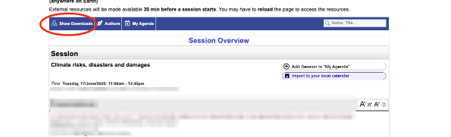
In order to access the full papers in the programme, please log into your ConfTool account and select “Browse conference agenda.” Please make sure you are logged in to your ConfTool account in order to be able to access the full PDFs of the papers. Once you are logged in, access a session (parallel, egg-timer) and select the “Show Downloads” button on the top left of the programme. Links to the PDF files will appear below each paper.
Papers are only available to registered participants.
Session Chairs
One person in each session is designated as the Session Chair; please check the detailed conference programme to see if you are the Chair of your session. Chair persons should come to the room at least 10 minutes before the start of the session. Chairs should briefly introduce the session and the speakers, make sure the time available is divided equally and guide the discussion from the floor following each presentation. To see if you will be chairing your session please check the detailed conference programme when it becomes available in June. In the unlikely case where the scheduled chair does not attend, the presenter of the session’s actual last paper is expected to take over the role of chair.
- Any questions regarding these instruction and late cancellations should be sent to programme@wcere2026.org.
- If you would like to upload a newer version of your paper, please log into your ConfTool account, go to Your Submissions and use the “Final Upload” button.
- If you would like to edit the Title or Abstract of your paper, or if the presenter of your paper needs to change, please log into your ConfTool account, go to Your Submissions and use the “Final Upload” button, which will allow you to edit all of your paper details.
- If you would like to update your name or affiliation, please log into your ConfTool account, go to Your Submissions and use the “Final Upload” button, which will allow you to edit all of your details as they will appear in the conference programme.



Instructions For Egg-timer Presenters
Presentation Format
Your presentation file should be in PowerPoint (.pptx or .ppt format) or pdf format. Participants are welcome to upload their presentation slides in advance of the conference using the link provided here. The slide upload platform will remain open until Monday, 29 June at 12:00 (noon) WEST. Any last-minute changes made after this deadline will need to be brought with you on a USB stick.
A computer (MS Windows environment) is available in each room of the conference venue. Please bring your presentation on a USB stick. Make sure to copy your presentation onto the computer in the assigned room before your session. Please include your last name in the file name to avoid confusion.
Please note that presentations should be given in English only.
Organisation of Sessions
The egg-timer sessions will run in parallel with paper presentation sessions. One person in each session is designated as the session Chair; please check the detailed conference programme to see if you are the Chair of your session. If you are, you will be in charge of time management. The time available for each egg-timer paper is 10 minutes of which 7 minutes are for the presentation and 3 minutes for general discussion. The tight schedule means strict time restrictions, so please respect your colleagues and keep to the allocated time for your presentation.
Here are some important guidelines to help make the egg-timer format work successfully:
- Seven minutes is not a long time so make sure you condense your message to fit the time frame.
- Your presentation should focus only on the key aspects of the paper. Please practice!
- You will find that you need very few slides.
- Be prepared for you presentation to be cut-short by the session chair if you go over time.
Presenters should come to the room at least 10 minutes before the start of the session to allow time for the presentations to be copied to the computer. A conference assistant will be available near your room in case of technical difficulties. Please go to the assigned room well in advance so the Chair of the session knows that you are present. Please respect your colleagues and keep to the allocated time for your presentation.
In order to access the full papers in the programme, please log into your ConfTool account and select “Browse conference agenda.” Please make sure you are logged in to your ConfTool account in order to be able to access the full PDFs of the papers. Once you are logged in, access a session (parallel, egg-timer) and select the “Show Downloads” button on the top left of the programme. Links to the PDF files will appear below each paper.
Papers are only available to registered participants.
Session Chairs
One person in each session is designated as the Session Chair; please check the detailed conference programme to see if you are the Chair of your session. Chair persons should come to the room at least 10 minutes before the start of the session. Chairs should briefly introduce the session and the speakers, make sure the time available is divided equally and guide the discussion from the floor following each presentation. To see if you will be chairing your session please check the detailed conference programme when it becomes available in June. In the unlikely case where the scheduled chair does not attend, the presenter of the session’s actual last paper is expected to take over the role of chair.
- Any questions regarding these instruction and late cancellations should be sent to programme@wcere2026.org.
- If you would like to upload a newer version of your paper, please log into your ConfTool account, go to Your Submissions and use the “Final Upload” button.
- If you would like to edit the Title or Abstract of your paper, or if the presenter of your paper needs to change, please log into your ConfTool account, go to Your Submissions and use the “Final Upload” button, which will allow you to edit all of your paper details.
- If you would like to edit the Title or Abstract of your paper, or if the presenter of your paper needs to change, please log into your ConfTool account, go to Your Submissions and use the “Final Upload” button, which will allow you to edit all of your paper details.
- If you would like to update your name or affiliation, please log into your ConfTool account, go to Your Submissions and use the “Final Upload” button, which will allow you to edit all of your details as they will appear in the conference programme.

